> ## Documentation Index
> Fetch the complete documentation index at: https://docs.localops.co/llms.txt
> Use this file to discover all available pages before exploring further.
# 2026
> Updates and improvements of year 2026
## Google Cloud support
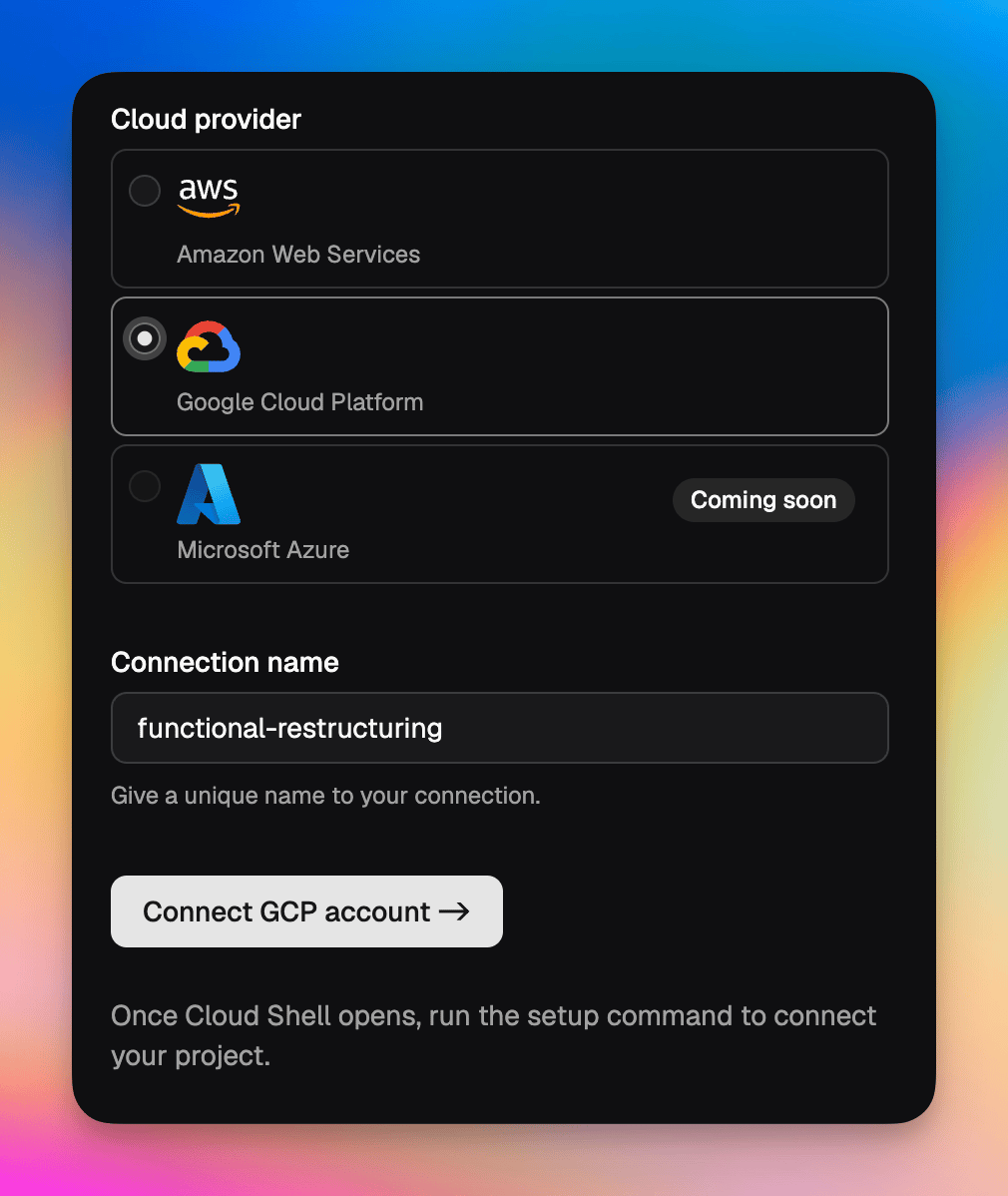 You can now spin up environments and deploy services on **Google Cloud** — just the way it works on AWS. The underlying cloud specifics are abstracted out, so your teams get the same developer experience regardless of whether they run on Google Cloud or AWS.
To get started, add a new connection, pick **Google Cloud**, and follow the setup flow. See [Connect a Google Cloud account](https://docs.localops.co/accounts/gcp) for the full walkthrough.
If you don't see Google Cloud as an option, write to us at [support@localops.co](mailto:support@localops.co) to get access.
## Update the CLI to v3.0.3
To use Google Cloud support, update the LocalOps CLI to **v3.0.3**. See the [CLI install guide](https://docs.localops.co/cli/usage) for how to update.
Questions? Email us at [support@localops.co](mailto:support@localops.co) or ping us in your Slack Connect support channel.
## GitLab support
You can now connect your GitLab repositories to LocalOps and enable continuous deployments on any cloud — your own cloud or your customer's cloud. Once connected, every push triggers a deployment through the same pipeline you already use, so GitLab-hosted teams get the full BYOC, single-tenant and self-hosted experience without changing where their code lives.
## Changelog for each Helm chart version
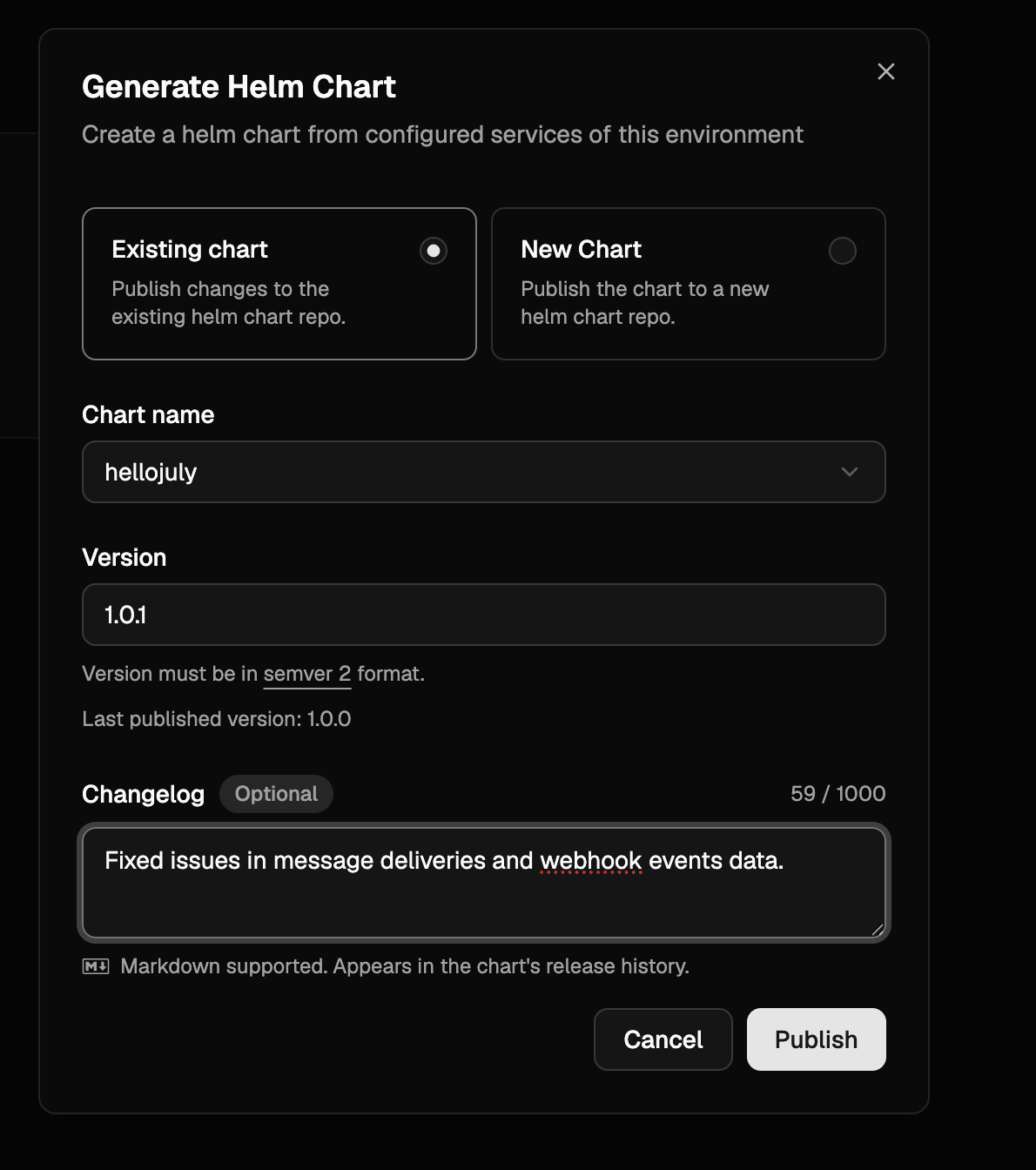
When generating a Helm chart, you can now add a changelog describing what changed in that version. The changelog is optional, supports Markdown, and appears in the chart's release history — so the teams installing your chart can see exactly what each version brings.
You can now spin up environments and deploy services on **Google Cloud** — just the way it works on AWS. The underlying cloud specifics are abstracted out, so your teams get the same developer experience regardless of whether they run on Google Cloud or AWS.
To get started, add a new connection, pick **Google Cloud**, and follow the setup flow. See [Connect a Google Cloud account](https://docs.localops.co/accounts/gcp) for the full walkthrough.
If you don't see Google Cloud as an option, write to us at [support@localops.co](mailto:support@localops.co) to get access.
## Update the CLI to v3.0.3
To use Google Cloud support, update the LocalOps CLI to **v3.0.3**. See the [CLI install guide](https://docs.localops.co/cli/usage) for how to update.
Questions? Email us at [support@localops.co](mailto:support@localops.co) or ping us in your Slack Connect support channel.
## GitLab support
You can now connect your GitLab repositories to LocalOps and enable continuous deployments on any cloud — your own cloud or your customer's cloud. Once connected, every push triggers a deployment through the same pipeline you already use, so GitLab-hosted teams get the full BYOC, single-tenant and self-hosted experience without changing where their code lives.
## Changelog for each Helm chart version
When generating a Helm chart, you can now add a changelog describing what changed in that version. The changelog is optional, supports Markdown, and appears in the chart's release history — so the teams installing your chart can see exactly what each version brings.
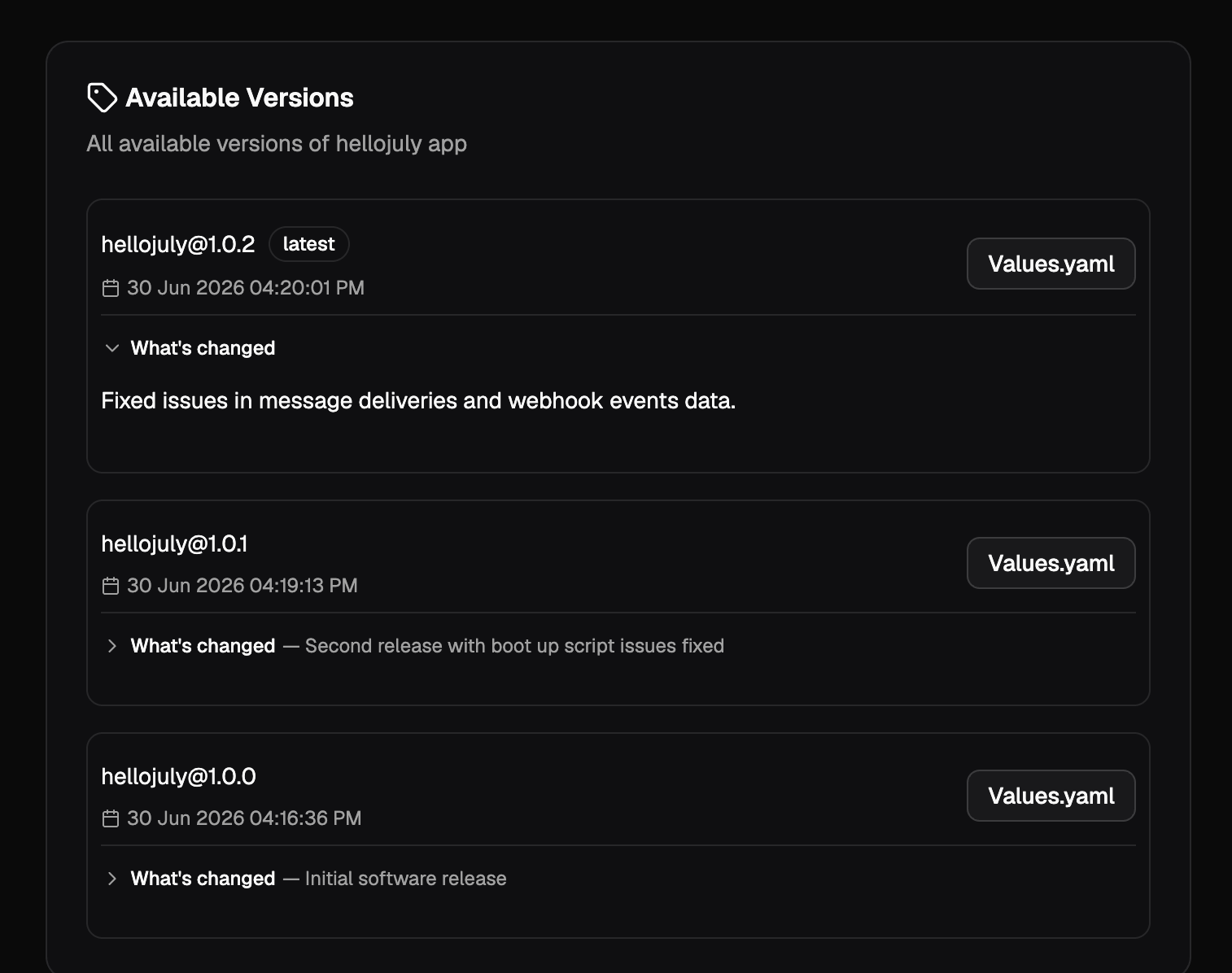
 The changelog shows up against every version under **Available Versions**, with a short summary and the full text expandable inline.
 Questions about either feature? Email us at [support@localops.co](mailto:support@localops.co) or ping us in your Slack Connect support channel.
## Reading the real client IP
New doc explaining which header to trust for the real client IP based on how your service is fronted. The short version:
| Setup | Read this header |
| ----------------------------------------------- | ----------------------------------------------------------------------------------------- |
| No CDN, HTTP | `X-Real-IP` (or `X-Forwarded-For`) |
| No CDN, HTTPS (via SSL-passthrough multiplexer) | `X-Real-IP` (or `X-Forwarded-For`) |
| Behind CDN | `X-Forwarded-For[0]` — or the CDN's own header like `CF-Connecting-IP` / `True-Client-IP` |
See [Client IP](https://docs.localops.co/environment/services/client-ip) for the full guidance, spoofing notes, and Node / Python / Go / Elixir examples.
## New warning when marking a Helm chart field as non-sensitive
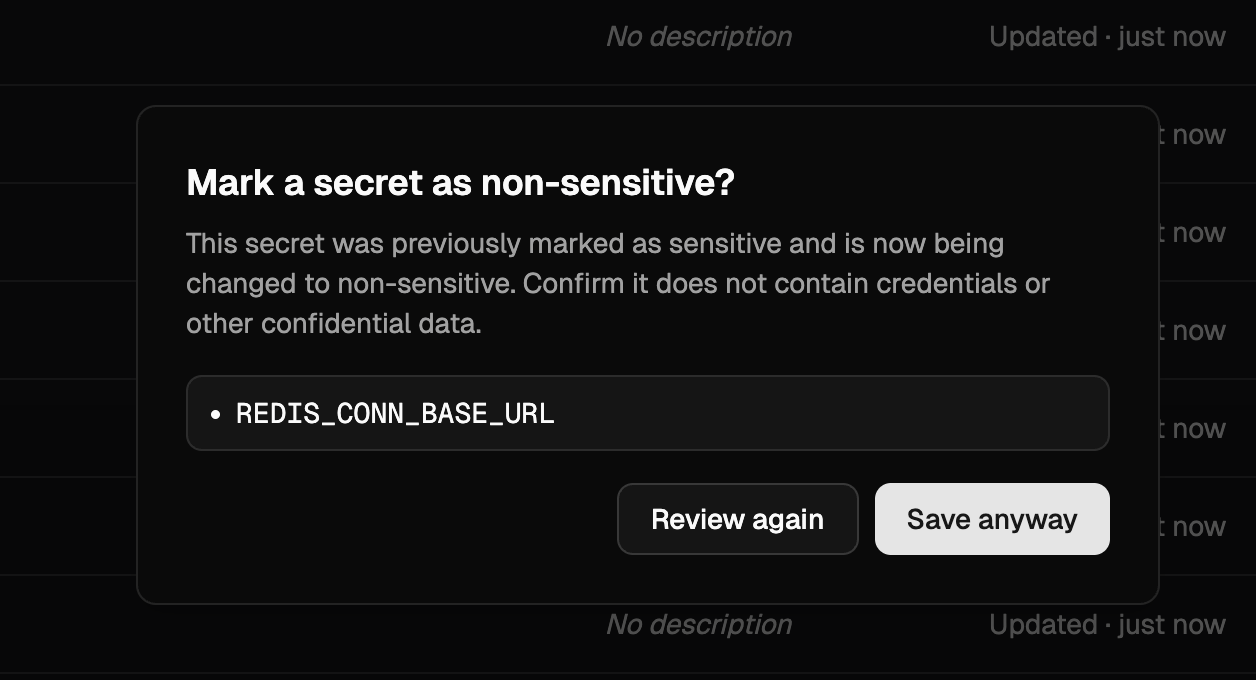
When editing a Helm chart's values in the console, switching a previously sensitive field to non-sensitive now prompts a confirmation dialog listing every affected key. This guards against accidentally exposing credentials or other confidential data — once a value is marked non-sensitive, it is stored and rendered in plain text.
Questions about either feature? Email us at [support@localops.co](mailto:support@localops.co) or ping us in your Slack Connect support channel.
## Reading the real client IP
New doc explaining which header to trust for the real client IP based on how your service is fronted. The short version:
| Setup | Read this header |
| ----------------------------------------------- | ----------------------------------------------------------------------------------------- |
| No CDN, HTTP | `X-Real-IP` (or `X-Forwarded-For`) |
| No CDN, HTTPS (via SSL-passthrough multiplexer) | `X-Real-IP` (or `X-Forwarded-For`) |
| Behind CDN | `X-Forwarded-For[0]` — or the CDN's own header like `CF-Connecting-IP` / `True-Client-IP` |
See [Client IP](https://docs.localops.co/environment/services/client-ip) for the full guidance, spoofing notes, and Node / Python / Go / Elixir examples.
## New warning when marking a Helm chart field as non-sensitive
When editing a Helm chart's values in the console, switching a previously sensitive field to non-sensitive now prompts a confirmation dialog listing every affected key. This guards against accidentally exposing credentials or other confidential data — once a value is marked non-sensitive, it is stored and rendered in plain text.
 ## `DEPLOYMENT_ID` and `LOPS_INSTANCE_ID` built-in secrets
Every service now receives `DEPLOYMENT_ID` and `LOPS_INSTANCE_ID` as built-in environment variables. Both carry the same 24-character alphanumeric value (as unique as a UUIDv4) — unique per LocalOps-managed environment, and unique per Helm install of charts generated by LocalOps. Use either to tag logs, metrics or external resources with the originating environment.
See [Built-in secrets](https://docs.localops.co/environment/services/secrets#built-in-secrets) for the full list.
## Import environment
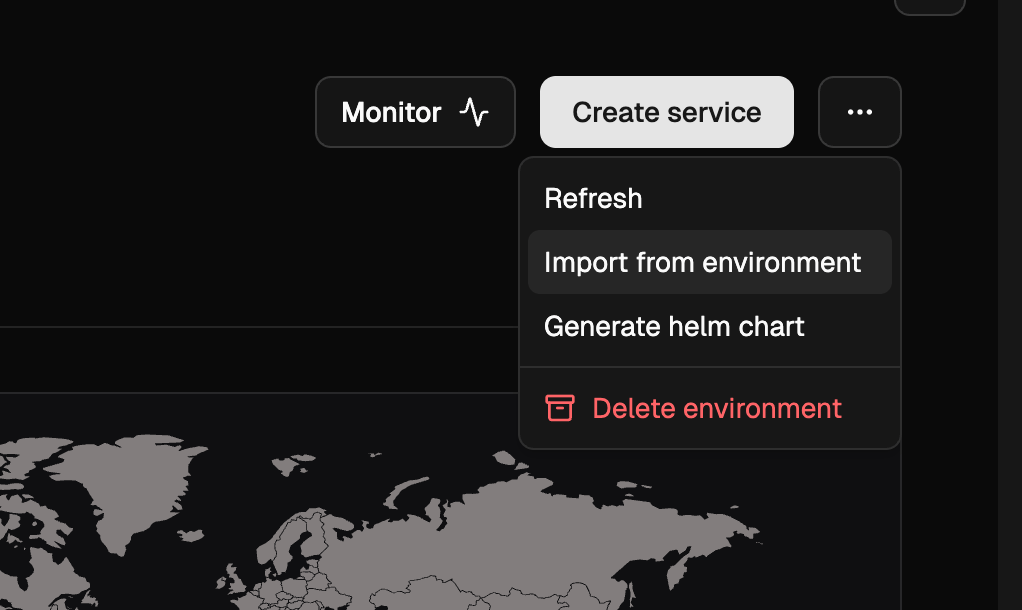
You can now create a new environment from one or more existing environments in just a few clicks via **Import environment**. In a brand new environment, click the 3-dots on the top right and choose "Import from environment". Pick a source environment and import — all services, secrets and cloud resources (RDS, ElastiCache, S3, etc.) are copied over, with inter-dependencies preserved, so you can start deploying as soon as the import finishes.
## `DEPLOYMENT_ID` and `LOPS_INSTANCE_ID` built-in secrets
Every service now receives `DEPLOYMENT_ID` and `LOPS_INSTANCE_ID` as built-in environment variables. Both carry the same 24-character alphanumeric value (as unique as a UUIDv4) — unique per LocalOps-managed environment, and unique per Helm install of charts generated by LocalOps. Use either to tag logs, metrics or external resources with the originating environment.
See [Built-in secrets](https://docs.localops.co/environment/services/secrets#built-in-secrets) for the full list.
## Import environment
You can now create a new environment from one or more existing environments in just a few clicks via **Import environment**. In a brand new environment, click the 3-dots on the top right and choose "Import from environment". Pick a source environment and import — all services, secrets and cloud resources (RDS, ElastiCache, S3, etc.) are copied over, with inter-dependencies preserved, so you can start deploying as soon as the import finishes.
 ## `managed_password` toggle for RDS
RDS instances in `ops.json` now accept a `managed_password` boolean. The default is `true`, where AWS RDS generates the master password, stores it in its own AWS Secrets Manager entry, and rotates it automatically. Setting it to `false` makes LocalOps generate a cryptographically unique string and use it as the RDS master password instead — the password is then not rotated, so this mode is not recommended. Regardless of which mode you pick, use `$password` and `$dsn` in `exports` to fetch the current password and connection string; LocalOps resolves them transparently in both cases.
```json theme={null}
{
"dependencies": {
"rds": {
"instances": [
{
"id": "test123",
"prefix": "testdep123",
"engine": "postgres",
"managed_password": true,
"exports": {
"MY_RDS_INSTANCE_PASSWORD": "$password",
"MY_RDS_INSTANCE_DSN": "$dsn"
}
}
]
}
}
}
```
See [RDS](https://docs.localops.co/environment/services/aws/rds) for details.
## OpenSearch as a dependency
You can now declare Amazon OpenSearch domains under `dependencies.opensearch.domains` in `ops.json`. LocalOps provisions production-tuned domains by default — 3-node multi-AZ quorum, encryption at rest, node-to-node encryption, HTTPS-only with TLS 1.2, fine-grained access control with an auto-generated master user in AWS Secrets Manager, and audit logging to CloudWatch. Preview environments are automatically scaled down to a single node. See [OpenSearch](https://docs.localops.co/environment/services/aws/opensearch) for the full reference.
```json theme={null}
{
"dependencies": {
"opensearch": {
"domains": [
{
"id": "productsearch",
"prefix": "product-search",
"engine_version": "OpenSearch_2.11",
"instance_type": "t3.small.search",
"node_count": 3,
"exports": {
"PRODUCT_SEARCH_DSN": "$dsn"
}
}
]
}
}
}
```
## `parameters` for RDS and ElastiCache
Both RDS instances and ElastiCache clusters now accept a `parameters` list in `ops.json` to configure DB / cache parameter group settings inline. LocalOps creates a dedicated parameter group for the resource and keeps it in sync as you add, update or remove entries on subsequent deployments.
For RDS, each entry takes a `name`, `value` and an `apply_method` of `immediate` or `pending-reboot` (use the latter for parameters like `shared_preload_libraries` that need a restart):
```json theme={null}
{
"parameters": [
{
"name": "shared_preload_libraries",
"value": "pg_stat_statements,pg_cron",
"apply_method": "pending-reboot"
}
]
}
```
For ElastiCache, each entry is just a `name` and `value`:
```json theme={null}
{
"parameters": [
{
"name": "maxmemory-policy",
"value": "volatile-lru"
}
]
}
```
See [RDS](https://docs.localops.co/environment/services/aws/rds) and [ElastiCache](https://docs.localops.co/environment/services/aws/elasti-cache) for details.
## Plaintext `$password` and `$dsn` exports for RDS
RDS exports now include `$password` and `$dsn` alongside the existing `$passwordArn`. `$password` resolves the master user password from AWS Secrets Manager and injects it directly as an environment variable, so your code does not need to call the Secrets Manager API. `$dsn` is a ready-to-use connection string in the form `postgres://$username:$password@$address:5432/$dbName` (or the MySQL equivalent) for libraries that accept a single URL. Treat both values as secrets.
```json theme={null}
{
"exports": {
"MY_RDS_INSTANCE_PASSWORD": "$password",
"MY_RDS_INSTANCE_DSN": "$dsn"
}
}
```
## Import managed secrets from other services
Secrets exported via `ops.json` now appear in each service's console secrets section as **managed secrets**. You can pull those exports into any other service in the same environment as a single secret — every key the source service exported is injected as environment variables in the importing service.
This is useful for wiring databases, caches and other declared cloud resources into the services that consume them. For example, a boot script job can declare an RDS instance in `ops.json` and export its DSN, username and password; any other service in the same environment can then import them all in one line. See [Importing other service secrets](https://docs.localops.co/environment/services/secrets#importing-other-service-secrets) for the syntax.
## Search in the service switcher
The service switcher now has a search bar at the top, so you can jump to a service by typing instead of scrolling. Handy in environments with a long list of services.
## Deletion protection for critical services
You can now turn on **deletion protection** for a service from its settings. Once enabled, the service cannot be deleted until protection is explicitly turned off — a safety net for production and other critical services where an accidental delete could cause downtime.
## ✋ Improvements and bug fixes
We have shipped a handful of bug fixes and small enhancements today to make day-to-day operations smoother. These are the kind of polish that adds up over time. Read on for the highlights.
#### Stop and start services on demand
Each service dashboard now has a **Stop** button in the top right corner. Use it to scale down a service's replica/container count to `0` on demand, without deleting the service or its configuration. Click start button to bring it back up.
#### Consistent image tag on redeploys
After updating secrets or scaling settings, users can trigger a new deployment. For docker image based services, this deployment was previously pulling the image with the `latest` tag. It now uses the exact image tag from the previous deployment, so redeploys stay consistent with what was last running.
## Valkey support for ElastiCache
ElastiCache clusters declared in `ops.json` can now use `valkey` as the engine, alongside `redis` and `memcache`. Pick a supported version from the [AWS Valkey versions list](https://docs.aws.amazon.com/AmazonElastiCache/latest/dg/supported-engine-versions-valkey.html). See [ElastiCache](https://docs.localops.co/environment/services/aws/elasti-cache) for details.
```json theme={null}
{
"dependencies": {
"elasticache": {
"clusters": [
{
"id": "test123",
"prefix": "testdep123",
"engine": "valkey",
"version": "8.0",
"instance_type": "cache.t4g.small",
"num_nodes": 1
}
]
}
}
}
```
## SSL passthrough
Services can now handle TLS termination themselves instead of letting the environment's nginx ingress decrypt traffic. Set `ssl_passthrough` to `true` in `ops.json` and configure your service's port to `443` so the ingress forwards raw TLS connections directly to your container. Useful for mTLS, custom certificate handling, or any protocol requiring end-to-end TLS. See [SSL passthrough](https://docs.localops.co/environment/services/ops-json#ssl-passthrough) for details.
```json theme={null}
{
"ssl_passthrough": true
}
```
## Instrument services with internal /metrics endpoint
You can record custom metrics and expose them to in-built prometheus monitoring stack via `/metrics` endpoint. Just add an ops.json file in your repository and declare "metrics" configuration as documented here - [Instrument services](https://docs.localops.co/environment/services/instrument-service) to get started.
```
{
"metrics": {
"endpoint": "/metrics",
"interval": 15,
"port": 9090
}
}
```
This can include:
* language run time metrics - NodeJS event loop metrics, JVM metrics, etc.,
* connection and request metrics like "tcp\_connections\_open"
* business metrics like "number\_of\_payments"
* transactional metrics like "number\_of\_emails\_sent"
Pro tip - Checkout the language specific guides to learn how you can unveil advanced metrics & dashaboards in just few mins of setup (eg: [See this Java guide](https://docs.localops.co/environment/services/instrument/java))
## Request timeouts
Set timeouts for TCP connections or requests handled by your services. Default timeout 60s may not be suitable for realtime applications with long running connections. Start declaring custom timeout values in ops.json as specificed in developer docs - [Request timeouts](https://docs.localops.co/environment/services/ops-json#request-timeouts).
### Private IPs passed as environment vars
`POD_IP` and `HOST_IP` are now injected in each service as environment variables. So if your application requires its own IP address, you can fetch and utilize in your business logic.
Learn more about [built-in environment vars](https://docs.localops.co/environment/services/secrets#built-in-secrets) like these.
### Other UI enhancements and fixes
1. Saving secrets triggers a "Write secrets" op to keep track of secret updates
2. While creating new service, search for repositories using the new search bar in the repository picker
3. Bug fixes in Member invite workflow
4. Bug fixes in preview environments
5. Other fixes in slack and ms teams notificaitons
## Projects revampled
We have revamped Projects. You can now create projects and organize environments in them.
### Members
Projects can have members. Unless an org member is also added as a project member, they can't see the project's environments or deploy to them.
### Revampled navigation bar
Sidebar navigation menu is revamped to make it easy to switcher between organization and projects.
Other bug fixes and UI enhancements were made too.
## Organization SSO (SAML 2.0)
We’ve introduced Single Sign-On (SSO) via SAML 2.0, allowing teams to manage access through their preferred identity
providers. This feature simplifies user onboarding and enhances security by centralizing authentication.
## `managed_password` toggle for RDS
RDS instances in `ops.json` now accept a `managed_password` boolean. The default is `true`, where AWS RDS generates the master password, stores it in its own AWS Secrets Manager entry, and rotates it automatically. Setting it to `false` makes LocalOps generate a cryptographically unique string and use it as the RDS master password instead — the password is then not rotated, so this mode is not recommended. Regardless of which mode you pick, use `$password` and `$dsn` in `exports` to fetch the current password and connection string; LocalOps resolves them transparently in both cases.
```json theme={null}
{
"dependencies": {
"rds": {
"instances": [
{
"id": "test123",
"prefix": "testdep123",
"engine": "postgres",
"managed_password": true,
"exports": {
"MY_RDS_INSTANCE_PASSWORD": "$password",
"MY_RDS_INSTANCE_DSN": "$dsn"
}
}
]
}
}
}
```
See [RDS](https://docs.localops.co/environment/services/aws/rds) for details.
## OpenSearch as a dependency
You can now declare Amazon OpenSearch domains under `dependencies.opensearch.domains` in `ops.json`. LocalOps provisions production-tuned domains by default — 3-node multi-AZ quorum, encryption at rest, node-to-node encryption, HTTPS-only with TLS 1.2, fine-grained access control with an auto-generated master user in AWS Secrets Manager, and audit logging to CloudWatch. Preview environments are automatically scaled down to a single node. See [OpenSearch](https://docs.localops.co/environment/services/aws/opensearch) for the full reference.
```json theme={null}
{
"dependencies": {
"opensearch": {
"domains": [
{
"id": "productsearch",
"prefix": "product-search",
"engine_version": "OpenSearch_2.11",
"instance_type": "t3.small.search",
"node_count": 3,
"exports": {
"PRODUCT_SEARCH_DSN": "$dsn"
}
}
]
}
}
}
```
## `parameters` for RDS and ElastiCache
Both RDS instances and ElastiCache clusters now accept a `parameters` list in `ops.json` to configure DB / cache parameter group settings inline. LocalOps creates a dedicated parameter group for the resource and keeps it in sync as you add, update or remove entries on subsequent deployments.
For RDS, each entry takes a `name`, `value` and an `apply_method` of `immediate` or `pending-reboot` (use the latter for parameters like `shared_preload_libraries` that need a restart):
```json theme={null}
{
"parameters": [
{
"name": "shared_preload_libraries",
"value": "pg_stat_statements,pg_cron",
"apply_method": "pending-reboot"
}
]
}
```
For ElastiCache, each entry is just a `name` and `value`:
```json theme={null}
{
"parameters": [
{
"name": "maxmemory-policy",
"value": "volatile-lru"
}
]
}
```
See [RDS](https://docs.localops.co/environment/services/aws/rds) and [ElastiCache](https://docs.localops.co/environment/services/aws/elasti-cache) for details.
## Plaintext `$password` and `$dsn` exports for RDS
RDS exports now include `$password` and `$dsn` alongside the existing `$passwordArn`. `$password` resolves the master user password from AWS Secrets Manager and injects it directly as an environment variable, so your code does not need to call the Secrets Manager API. `$dsn` is a ready-to-use connection string in the form `postgres://$username:$password@$address:5432/$dbName` (or the MySQL equivalent) for libraries that accept a single URL. Treat both values as secrets.
```json theme={null}
{
"exports": {
"MY_RDS_INSTANCE_PASSWORD": "$password",
"MY_RDS_INSTANCE_DSN": "$dsn"
}
}
```
## Import managed secrets from other services
Secrets exported via `ops.json` now appear in each service's console secrets section as **managed secrets**. You can pull those exports into any other service in the same environment as a single secret — every key the source service exported is injected as environment variables in the importing service.
This is useful for wiring databases, caches and other declared cloud resources into the services that consume them. For example, a boot script job can declare an RDS instance in `ops.json` and export its DSN, username and password; any other service in the same environment can then import them all in one line. See [Importing other service secrets](https://docs.localops.co/environment/services/secrets#importing-other-service-secrets) for the syntax.
## Search in the service switcher
The service switcher now has a search bar at the top, so you can jump to a service by typing instead of scrolling. Handy in environments with a long list of services.
## Deletion protection for critical services
You can now turn on **deletion protection** for a service from its settings. Once enabled, the service cannot be deleted until protection is explicitly turned off — a safety net for production and other critical services where an accidental delete could cause downtime.
## ✋ Improvements and bug fixes
We have shipped a handful of bug fixes and small enhancements today to make day-to-day operations smoother. These are the kind of polish that adds up over time. Read on for the highlights.
#### Stop and start services on demand
Each service dashboard now has a **Stop** button in the top right corner. Use it to scale down a service's replica/container count to `0` on demand, without deleting the service or its configuration. Click start button to bring it back up.
#### Consistent image tag on redeploys
After updating secrets or scaling settings, users can trigger a new deployment. For docker image based services, this deployment was previously pulling the image with the `latest` tag. It now uses the exact image tag from the previous deployment, so redeploys stay consistent with what was last running.
## Valkey support for ElastiCache
ElastiCache clusters declared in `ops.json` can now use `valkey` as the engine, alongside `redis` and `memcache`. Pick a supported version from the [AWS Valkey versions list](https://docs.aws.amazon.com/AmazonElastiCache/latest/dg/supported-engine-versions-valkey.html). See [ElastiCache](https://docs.localops.co/environment/services/aws/elasti-cache) for details.
```json theme={null}
{
"dependencies": {
"elasticache": {
"clusters": [
{
"id": "test123",
"prefix": "testdep123",
"engine": "valkey",
"version": "8.0",
"instance_type": "cache.t4g.small",
"num_nodes": 1
}
]
}
}
}
```
## SSL passthrough
Services can now handle TLS termination themselves instead of letting the environment's nginx ingress decrypt traffic. Set `ssl_passthrough` to `true` in `ops.json` and configure your service's port to `443` so the ingress forwards raw TLS connections directly to your container. Useful for mTLS, custom certificate handling, or any protocol requiring end-to-end TLS. See [SSL passthrough](https://docs.localops.co/environment/services/ops-json#ssl-passthrough) for details.
```json theme={null}
{
"ssl_passthrough": true
}
```
## Instrument services with internal /metrics endpoint
You can record custom metrics and expose them to in-built prometheus monitoring stack via `/metrics` endpoint. Just add an ops.json file in your repository and declare "metrics" configuration as documented here - [Instrument services](https://docs.localops.co/environment/services/instrument-service) to get started.
```
{
"metrics": {
"endpoint": "/metrics",
"interval": 15,
"port": 9090
}
}
```
This can include:
* language run time metrics - NodeJS event loop metrics, JVM metrics, etc.,
* connection and request metrics like "tcp\_connections\_open"
* business metrics like "number\_of\_payments"
* transactional metrics like "number\_of\_emails\_sent"
Pro tip - Checkout the language specific guides to learn how you can unveil advanced metrics & dashaboards in just few mins of setup (eg: [See this Java guide](https://docs.localops.co/environment/services/instrument/java))
## Request timeouts
Set timeouts for TCP connections or requests handled by your services. Default timeout 60s may not be suitable for realtime applications with long running connections. Start declaring custom timeout values in ops.json as specificed in developer docs - [Request timeouts](https://docs.localops.co/environment/services/ops-json#request-timeouts).
### Private IPs passed as environment vars
`POD_IP` and `HOST_IP` are now injected in each service as environment variables. So if your application requires its own IP address, you can fetch and utilize in your business logic.
Learn more about [built-in environment vars](https://docs.localops.co/environment/services/secrets#built-in-secrets) like these.
### Other UI enhancements and fixes
1. Saving secrets triggers a "Write secrets" op to keep track of secret updates
2. While creating new service, search for repositories using the new search bar in the repository picker
3. Bug fixes in Member invite workflow
4. Bug fixes in preview environments
5. Other fixes in slack and ms teams notificaitons
## Projects revampled
We have revamped Projects. You can now create projects and organize environments in them.
### Members
Projects can have members. Unless an org member is also added as a project member, they can't see the project's environments or deploy to them.
### Revampled navigation bar
Sidebar navigation menu is revamped to make it easy to switcher between organization and projects.
Other bug fixes and UI enhancements were made too.
## Organization SSO (SAML 2.0)
We’ve introduced Single Sign-On (SSO) via SAML 2.0, allowing teams to manage access through their preferred identity
providers. This feature simplifies user onboarding and enhances security by centralizing authentication.
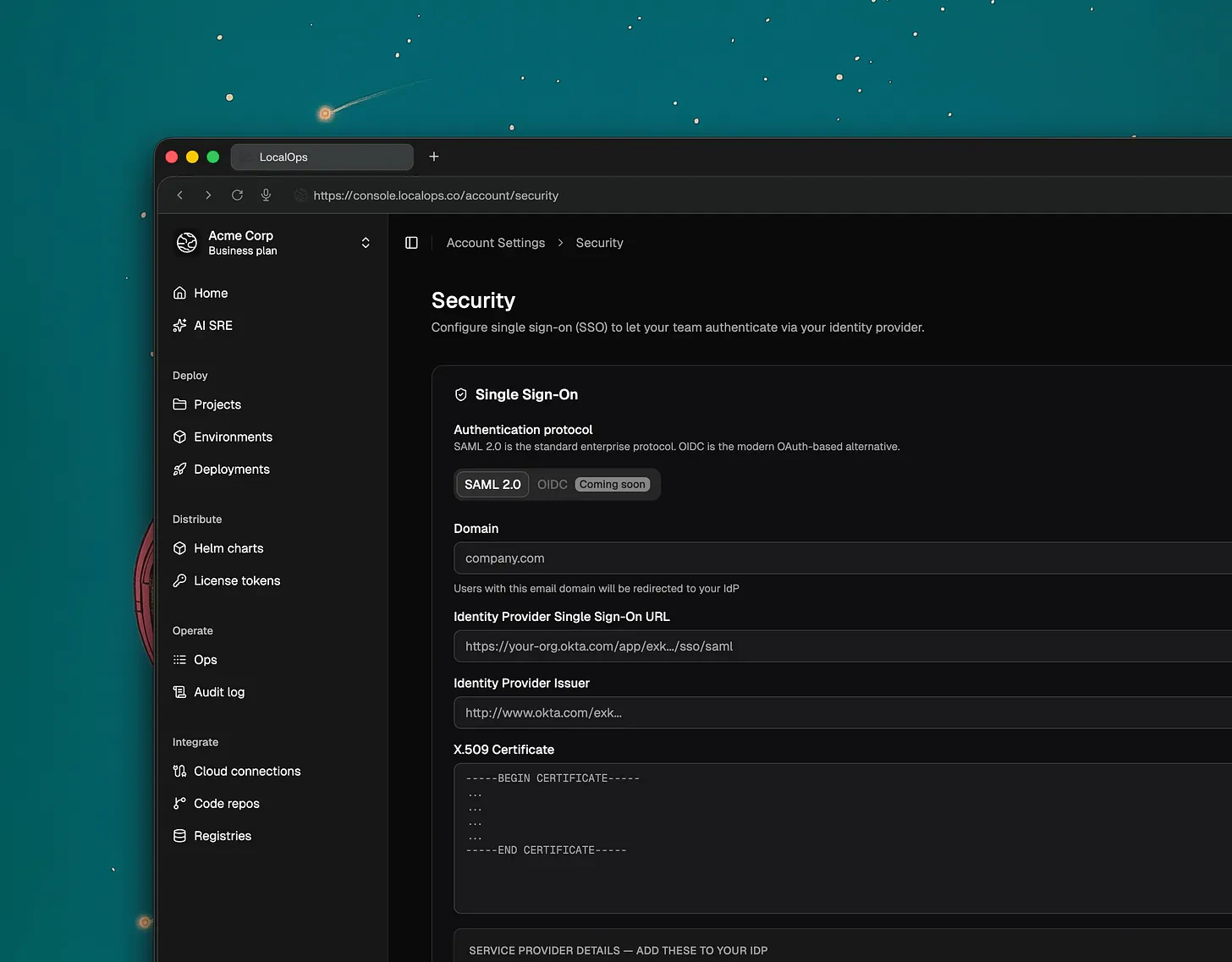 Any SAML2.0 compliant identity provider is supported through this SAML2.0.
* Okta
* Microsoft Entra ID
* Google Workspace SSO
* OneLogin
* Auth0
**Availability: Now available for all Business Plan customers**
> What’s Next: OIDC (OpenID Connect) support is currently in development and will be released soon.
#### Improved CLI Organization Management
Users who belong to multiple organizations can now explicitly select their active organization directly within the
Command Line Interface (CLI). This ensures that commands and deployments are always targeted at the correct environment
without manual configuration overrides.
#### Simplified Manual Deployments
To streamline the redeployment process, we’ve added a new option in the manual deployment section. You can now quickly
select and use the last successfully deployed Docker or Helm images, reducing the risk of version mismatch during quick
fixes or rollbacks.
#### Security Improvements
We’ve strengthened the security of our OAuth device authorization flow to further using stricter state validation and
session integrity.
## Switch organizations/teams & New CLI update
If you run multiple products and multiple engineering teams handling their own qa, uat and production environments, you
will love this update.
**Switch organizations:**
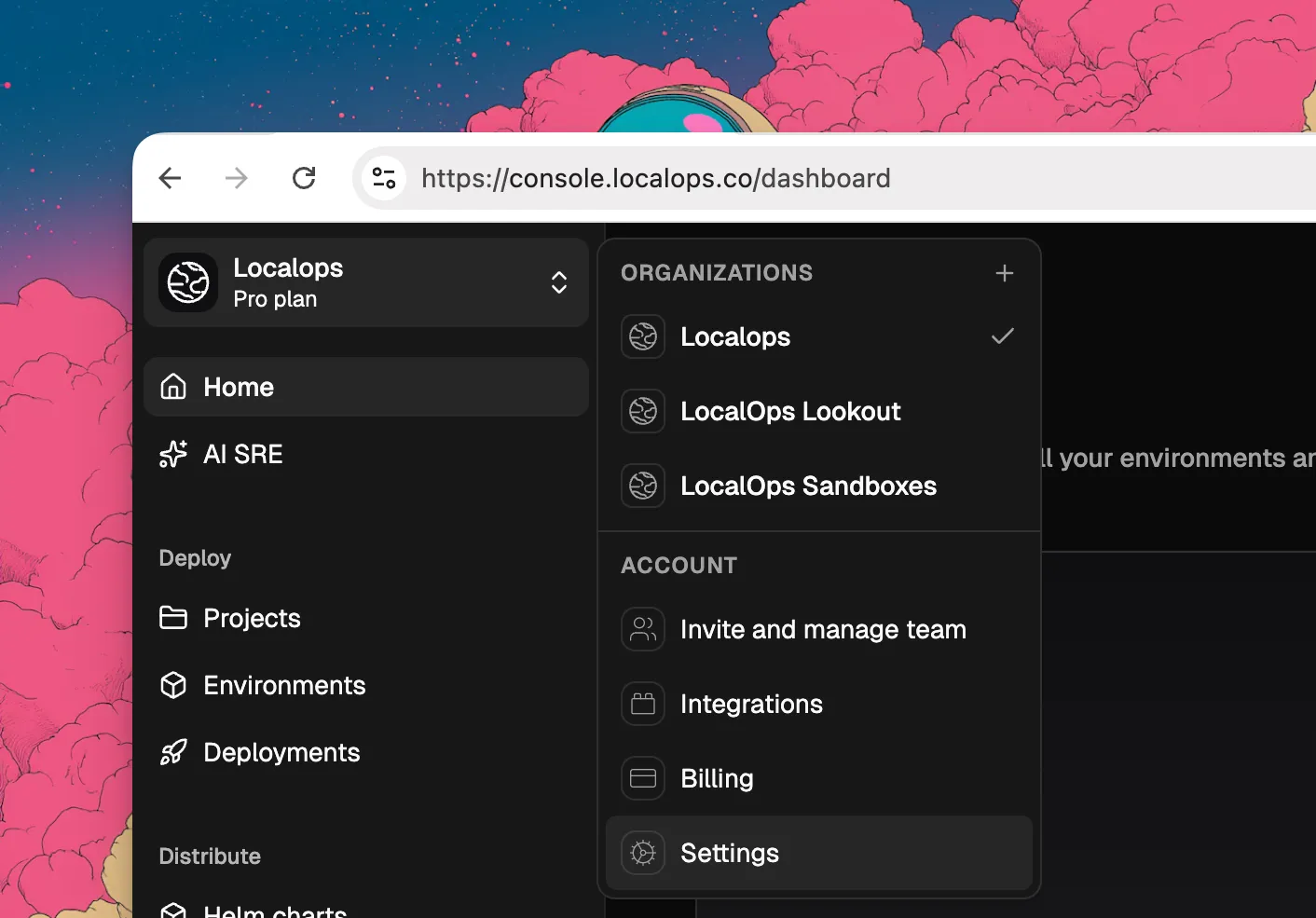
Users can now belong to multiple organizations using their same login / email address. And they can easily switch
between the organizations from the top left menu like this:
Any SAML2.0 compliant identity provider is supported through this SAML2.0.
* Okta
* Microsoft Entra ID
* Google Workspace SSO
* OneLogin
* Auth0
**Availability: Now available for all Business Plan customers**
> What’s Next: OIDC (OpenID Connect) support is currently in development and will be released soon.
#### Improved CLI Organization Management
Users who belong to multiple organizations can now explicitly select their active organization directly within the
Command Line Interface (CLI). This ensures that commands and deployments are always targeted at the correct environment
without manual configuration overrides.
#### Simplified Manual Deployments
To streamline the redeployment process, we’ve added a new option in the manual deployment section. You can now quickly
select and use the last successfully deployed Docker or Helm images, reducing the risk of version mismatch during quick
fixes or rollbacks.
#### Security Improvements
We’ve strengthened the security of our OAuth device authorization flow to further using stricter state validation and
session integrity.
## Switch organizations/teams & New CLI update
If you run multiple products and multiple engineering teams handling their own qa, uat and production environments, you
will love this update.
**Switch organizations:**
Users can now belong to multiple organizations using their same login / email address. And they can easily switch
between the organizations from the top left menu like this:
 Each organization can have unique environments like this:
* Github org
* ECR Registries
* Environments
* qa
* uat
* production
* Deployments
**Enhanced CLI Login:**
LocalOps CLI now use [device auth](https://datatracker.ietf.org/doc/html/rfc8628) for more seamless and secure login. To
login, just type this in your terminal:
```bash theme={null}
ops login
```
Each organization can have unique environments like this:
* Github org
* ECR Registries
* Environments
* qa
* uat
* production
* Deployments
**Enhanced CLI Login:**
LocalOps CLI now use [device auth](https://datatracker.ietf.org/doc/html/rfc8628) for more seamless and secure login. To
login, just type this in your terminal:
```bash theme={null}
ops login
```
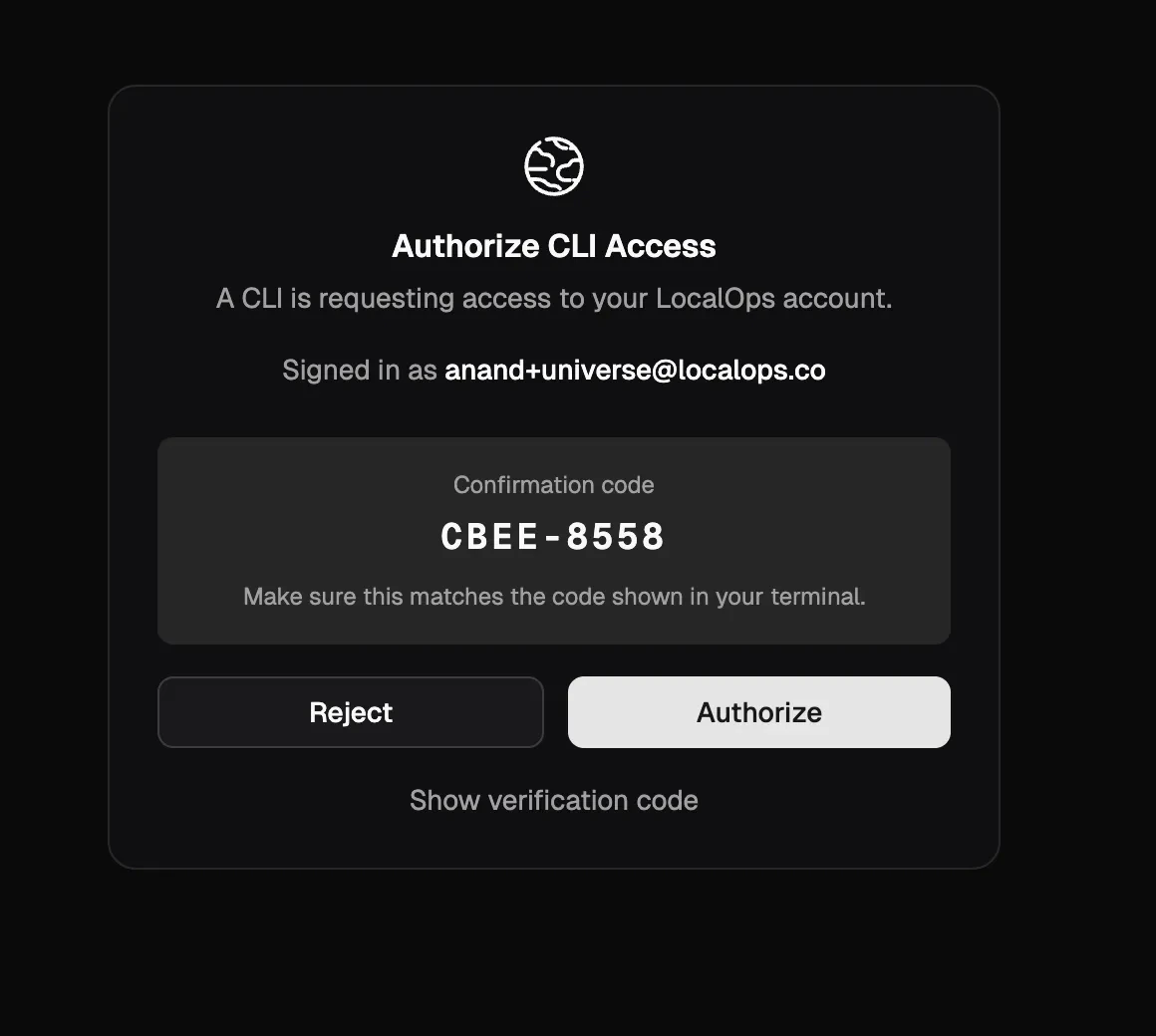
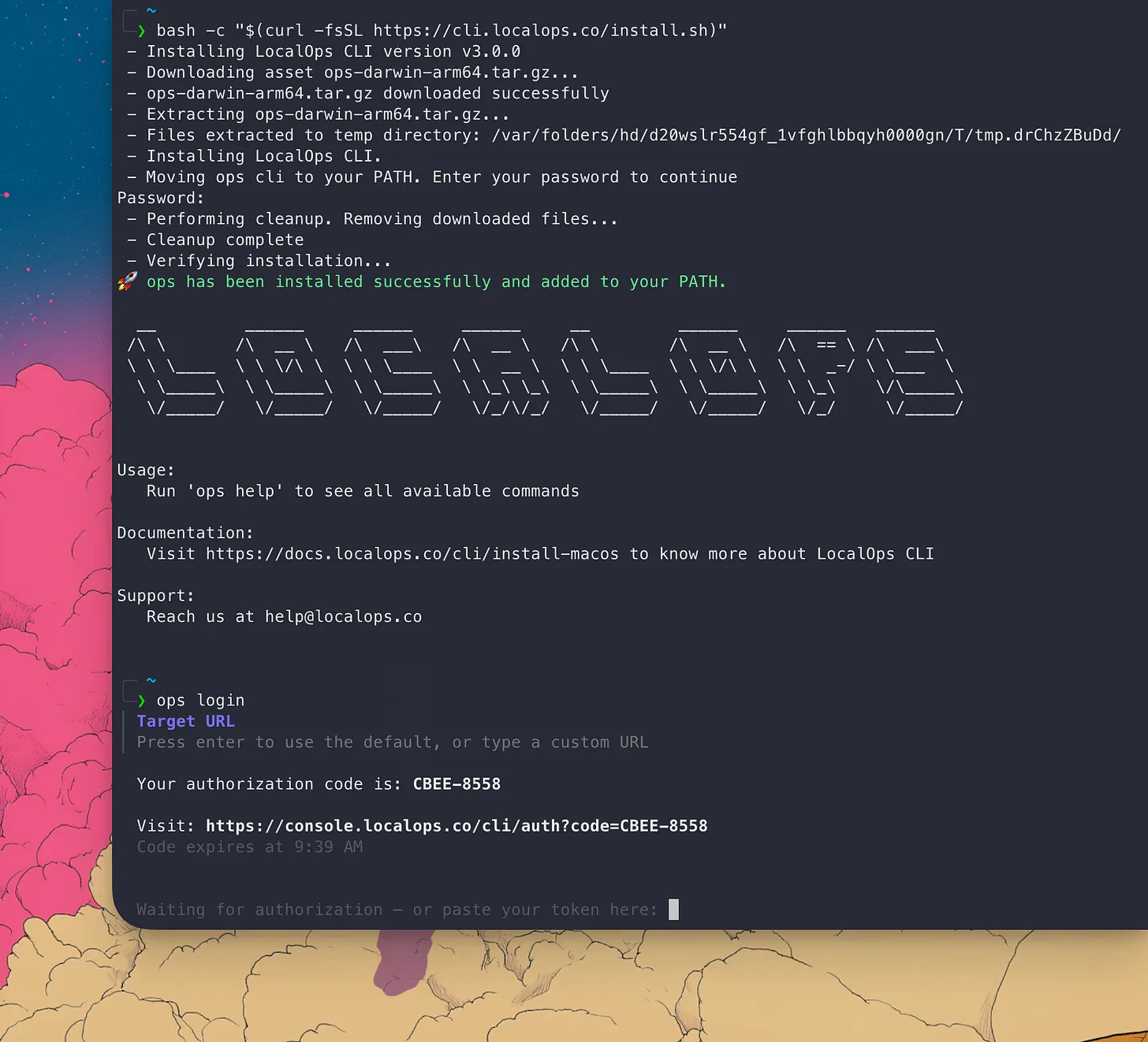 And you will get a link to click and open the browser. If you’re already logged in to LocalOps console
(console.localops.co), we will show up the authorization form that CLI is requesting to use your current login. Once you
authorize, boom! You can access LocalOps services via CLI
And you will get a link to click and open the browser. If you’re already logged in to LocalOps console
(console.localops.co), we will show up the authorization form that CLI is requesting to use your current login. Once you
authorize, boom! You can access LocalOps services via CLI
 You will need to update the CLI version to v3.0.0 to get this update. Checkout [cli](/cli) docs for installing the
correct CLI for your OS.
## Custom CIDRs for environments
While creating new environments, you can now specify custom CIDR block for your environments. This will be used to
create VPCs and subnets in your cloud accounts and will give more control over your network configurations.
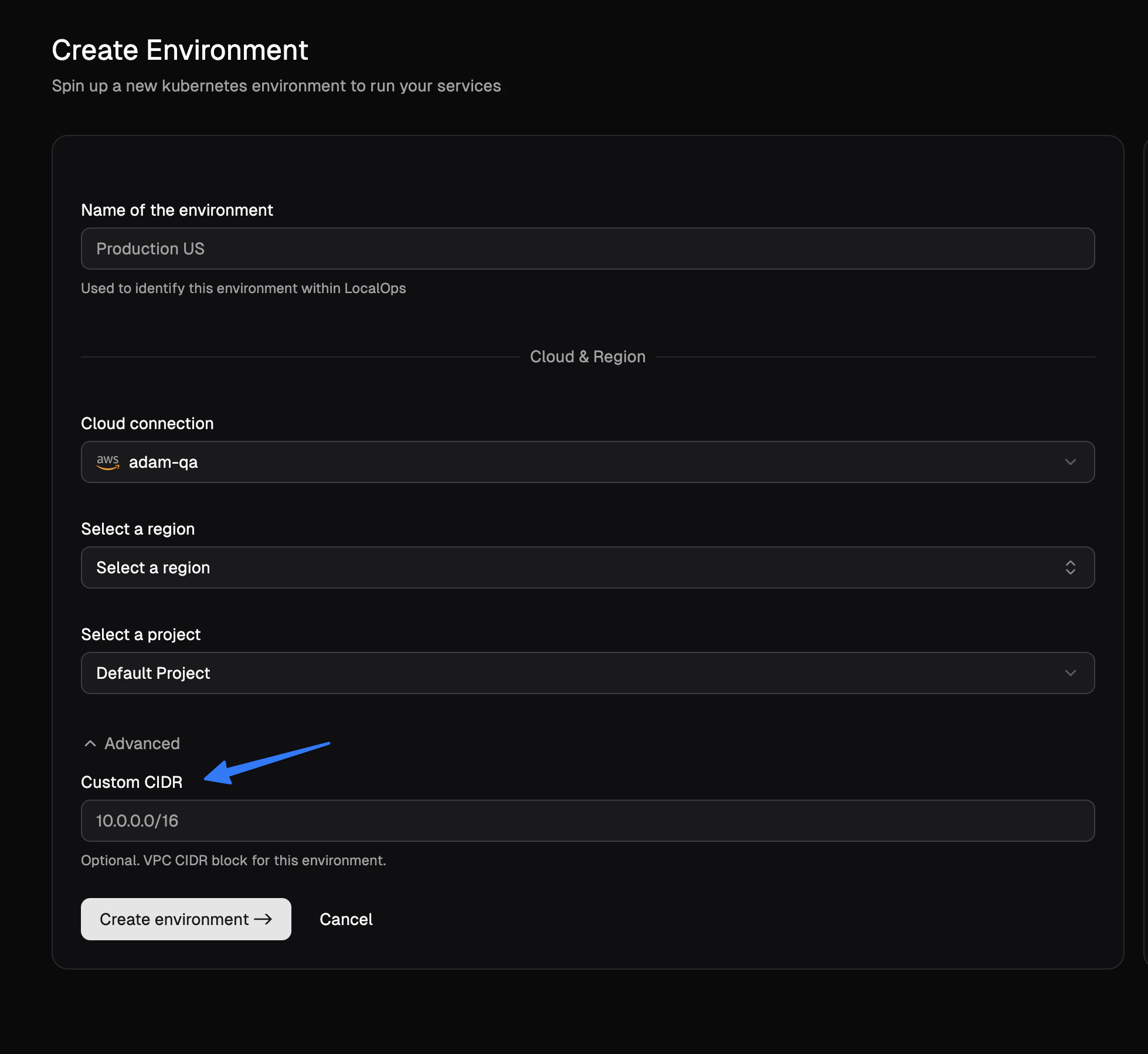
In the Create environment page, you can click on "Advanced options" to see the new field for custom CIDR block. You can
specify any valid CIDR block that you want for your environment.
You will need to update the CLI version to v3.0.0 to get this update. Checkout [cli](/cli) docs for installing the
correct CLI for your OS.
## Custom CIDRs for environments
While creating new environments, you can now specify custom CIDR block for your environments. This will be used to
create VPCs and subnets in your cloud accounts and will give more control over your network configurations.
In the Create environment page, you can click on "Advanced options" to see the new field for custom CIDR block. You can
specify any valid CIDR block that you want for your environment.
 ## Realtime run status of services
We released a major new enhancement to services today. You can now see the realtime status of all services running
within each environment, without having to use LocalOps CLI or Kubectl CLI.
## Realtime run status of services
We released a major new enhancement to services today. You can now see the realtime status of all services running
within each environment, without having to use LocalOps CLI or Kubectl CLI.
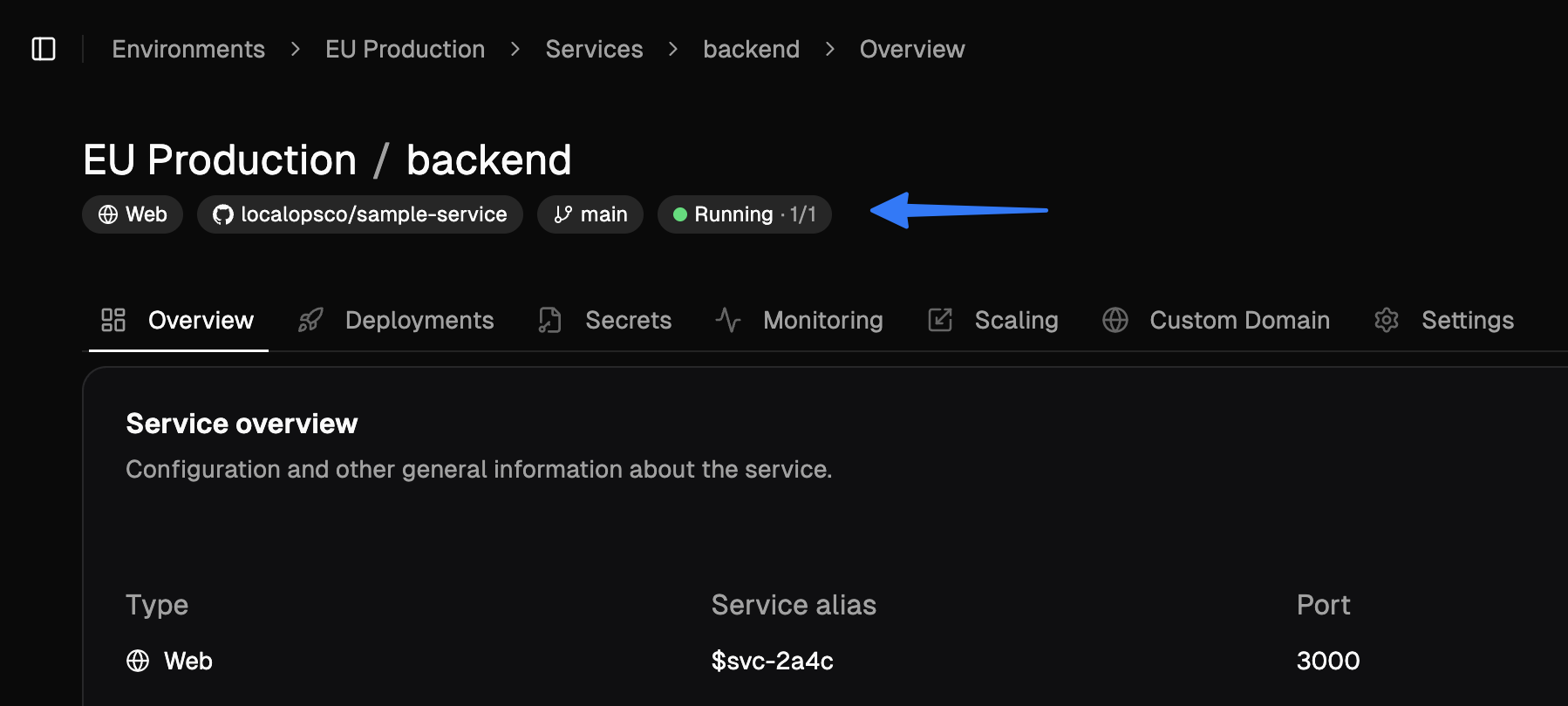 Depending on the service type, status text will be different. Here are the possible status texts:
For example, for `web`, `internal` services and `worker` services, you will see the following statuses:
* running (2/2)
* degraded (1/2)
* failing (0/2)
* stopped
(x/y) format shows the number of replicas running (x) out of total number of replicas (y).
For job services:
* pending
* succeeded
* failed
* timeout
For cronjob services:
* idle
* active
* suspended
You can see them in service tile view or within service section at the top of the page.
### New "Runs" tab
Lookout for the new "Runs" tab for job and cronjob services. You can see the run history and status of each run.
We update statuses in near real time so you would know when you service is failing, just by looking at the status text
in LocalOps console.
All of these changes were made to make it easier for you to monitor and manage your services, without having to drop
into shell or CLI.
## New feature: Custom Node groups
So far, environments have been having a single node group created, to run all the services.
Now, you can create multiple node groups to run different types of services. For each node group you can pick
1. AMIs
2. Instance types
3. Desired count of nodes
Depending on the service type, status text will be different. Here are the possible status texts:
For example, for `web`, `internal` services and `worker` services, you will see the following statuses:
* running (2/2)
* degraded (1/2)
* failing (0/2)
* stopped
(x/y) format shows the number of replicas running (x) out of total number of replicas (y).
For job services:
* pending
* succeeded
* failed
* timeout
For cronjob services:
* idle
* active
* suspended
You can see them in service tile view or within service section at the top of the page.
### New "Runs" tab
Lookout for the new "Runs" tab for job and cronjob services. You can see the run history and status of each run.
We update statuses in near real time so you would know when you service is failing, just by looking at the status text
in LocalOps console.
All of these changes were made to make it easier for you to monitor and manage your services, without having to drop
into shell or CLI.
## New feature: Custom Node groups
So far, environments have been having a single node group created, to run all the services.
Now, you can create multiple node groups to run different types of services. For each node group you can pick
1. AMIs
2. Instance types
3. Desired count of nodes
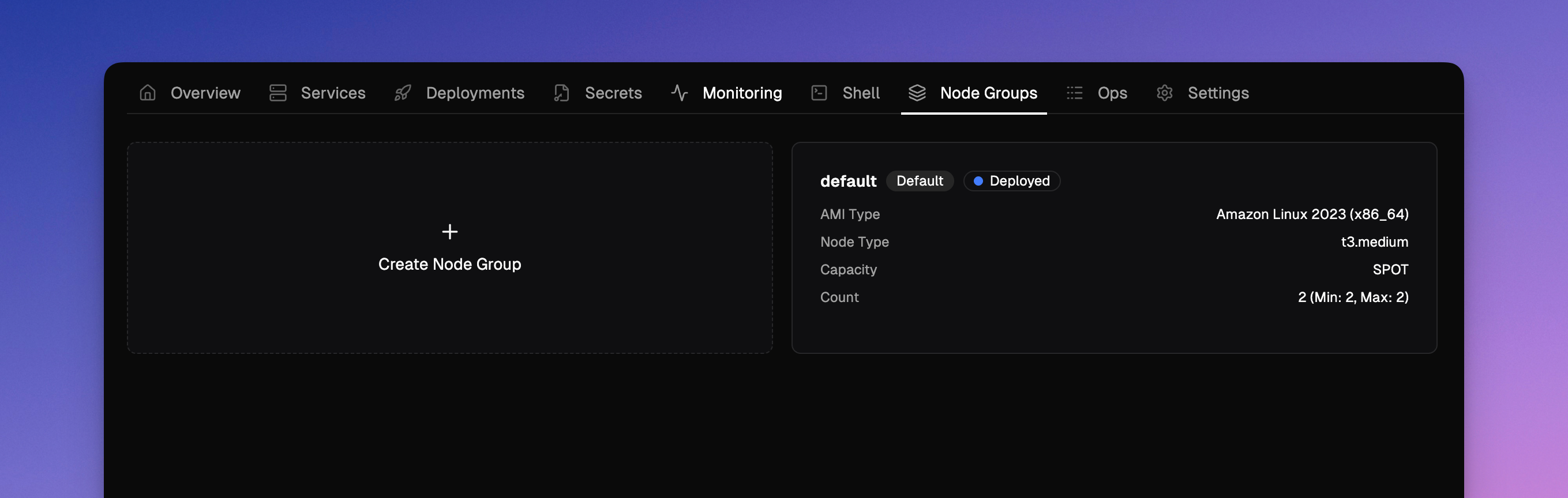 Go to the new Node groups section to create and manage node groups.
You can now create
1. Windows node groups to run windows based services (or)
2. Linux node groups to run linux base services
And while creating a service or updating a service, you can assign it to any one of the node groups. And all its
replicas or containers will run in configured nodes.
## Spot instances
In the case of AWS evnironments, while creating node groups, you can pick between ON\_DEMAND or SPOT as capacity types.
So you can create node groups of SPOT instance type and assign interruptible and idempotent services like jobs, crons,
batch processing, or other. This will end up giving up to 50% savings in compute costs.
## New feature: Deployment notes
While triggering new deployments, you can now pass a note text to it. And it will communicate to rest of the team about
what the deployment is all about.
We made other QoS updates here to ensure smooth execution of deployment pipelines.
## New feature: Account level resource tags
All cloud resources of all environments spinned by LocalOps are attached with two standard tags. One with ID of the
environment and another with name of the environment. These tags can be used in Cost explorer to analyse costs at a
granular level.
We released a new feature today to accept custom tags so that you can assign your own key value pairs as tags for all
resources spinned up in all environments of the account. You can use it to attach tags like:
1. `bu: internal`
2. `bu: product-1`
3. `project: project-name`
Go to Account settings > Resource tags to start adding custom tags.
## Bring your own registry
LocalOps can now use your images from your own docker registry to deploy services in your environments. Go to the new
Registries section to add any private docker registry.
We support ECR & DockerHub as of today and plan to support other providers in the coming weeks.
1. Amazon Elastic Container Registry (ECR)
2. DockerHub
3. Google container registry
4. Azure container registry
5. Github packages
([Talk to us](mailto:anand@localops.co) if you need us to support any other registry).
## Bring your code pipeline
### Deploy using LocalOps API
You can run your exisitng code build pipelines to build code and finally call LocalOps API to deploy the code to your
environment. Checkout the API reference for the new /deploy api
[here](https://docs.localops.co/api-reference/deploy-service).
Eg.,
```bash theme={null}
curl --request POST \
--url https://sdk.localops.co/v1/environments/{envId}/services/{serviceId}/deploy \
--header 'Authorization: Bearer ' \
--header 'Content-Type: application/json' \
--data '
{
"docker_image_tag": "a1b2c3d4"
}
'
```
### 🍦 Deploy using LocalOps Github action
To cut work, you can also embed our Github action step directly within your `.github/workflows/deploy.yml` to trigger
new deployments.
Like:
```yaml theme={null}
- use: localopsco/deploy-action
with:
- service: auf-d0923-8rljks-fd9o8
- environment: afdsfk-j092309-4laskd-jf32
- token: aslkjadsf-dkjfie-uriw-skjf-19823r
- docker_image_tag: 1.2.2
```
You can pass `docker_image_tag` or `commit_id` or `helm_chart_version` to the action to trigger new deployments.
or with commit sha like:
```yaml theme={null}
- use: localopsco/deploy-action
with:
- service: auf-d0923-8rljks-fd9o8
- environment: afdsfk-j092309-4laskd-jf32
- token: aslkjadsf-dkjfie-uriw-skjf-19823r
- commit_id: akf9a0sd98
```
## Pass ops.json as configuration
For Docker-image based services, you can now add ops.json as configuration to the service settings within LocalOps
console. This will work as documented in ops.json configuration
[here](https://docs.localops.co/environment/services/ops-json).
For the previous year, check out [2025](/changelogs/2025)
[demo]: https://go.localops.co/tour
[signup]: https://console.localops.co/signup
Go to the new Node groups section to create and manage node groups.
You can now create
1. Windows node groups to run windows based services (or)
2. Linux node groups to run linux base services
And while creating a service or updating a service, you can assign it to any one of the node groups. And all its
replicas or containers will run in configured nodes.
## Spot instances
In the case of AWS evnironments, while creating node groups, you can pick between ON\_DEMAND or SPOT as capacity types.
So you can create node groups of SPOT instance type and assign interruptible and idempotent services like jobs, crons,
batch processing, or other. This will end up giving up to 50% savings in compute costs.
## New feature: Deployment notes
While triggering new deployments, you can now pass a note text to it. And it will communicate to rest of the team about
what the deployment is all about.
We made other QoS updates here to ensure smooth execution of deployment pipelines.
## New feature: Account level resource tags
All cloud resources of all environments spinned by LocalOps are attached with two standard tags. One with ID of the
environment and another with name of the environment. These tags can be used in Cost explorer to analyse costs at a
granular level.
We released a new feature today to accept custom tags so that you can assign your own key value pairs as tags for all
resources spinned up in all environments of the account. You can use it to attach tags like:
1. `bu: internal`
2. `bu: product-1`
3. `project: project-name`
Go to Account settings > Resource tags to start adding custom tags.
## Bring your own registry
LocalOps can now use your images from your own docker registry to deploy services in your environments. Go to the new
Registries section to add any private docker registry.
We support ECR & DockerHub as of today and plan to support other providers in the coming weeks.
1. Amazon Elastic Container Registry (ECR)
2. DockerHub
3. Google container registry
4. Azure container registry
5. Github packages
([Talk to us](mailto:anand@localops.co) if you need us to support any other registry).
## Bring your code pipeline
### Deploy using LocalOps API
You can run your exisitng code build pipelines to build code and finally call LocalOps API to deploy the code to your
environment. Checkout the API reference for the new /deploy api
[here](https://docs.localops.co/api-reference/deploy-service).
Eg.,
```bash theme={null}
curl --request POST \
--url https://sdk.localops.co/v1/environments/{envId}/services/{serviceId}/deploy \
--header 'Authorization: Bearer ' \
--header 'Content-Type: application/json' \
--data '
{
"docker_image_tag": "a1b2c3d4"
}
'
```
### 🍦 Deploy using LocalOps Github action
To cut work, you can also embed our Github action step directly within your `.github/workflows/deploy.yml` to trigger
new deployments.
Like:
```yaml theme={null}
- use: localopsco/deploy-action
with:
- service: auf-d0923-8rljks-fd9o8
- environment: afdsfk-j092309-4laskd-jf32
- token: aslkjadsf-dkjfie-uriw-skjf-19823r
- docker_image_tag: 1.2.2
```
You can pass `docker_image_tag` or `commit_id` or `helm_chart_version` to the action to trigger new deployments.
or with commit sha like:
```yaml theme={null}
- use: localopsco/deploy-action
with:
- service: auf-d0923-8rljks-fd9o8
- environment: afdsfk-j092309-4laskd-jf32
- token: aslkjadsf-dkjfie-uriw-skjf-19823r
- commit_id: akf9a0sd98
```
## Pass ops.json as configuration
For Docker-image based services, you can now add ops.json as configuration to the service settings within LocalOps
console. This will work as documented in ops.json configuration
[here](https://docs.localops.co/environment/services/ops-json).
For the previous year, check out [2025](/changelogs/2025)
[demo]: https://go.localops.co/tour
[signup]: https://console.localops.co/signup