> ## Documentation Index
> Fetch the complete documentation index at: https://docs.localops.co/llms.txt
> Use this file to discover all available pages before exploring further.
# Preview environments (full stack)
> How to spin up ephemeral full-stack enviornments to test pull requests in isolation
## Overview
LocalOps can automatically spin up ephemeral/temporary services to run your code, for every pull request your team
creates in GitHub. Each copy can be a full-stack spin-off when combined with
[ops.json configuration](/environment/services/ops-json). Read on to learn more.
### How it works
Create a [new environment](/environment/create) if one doesn't exist. This will create a VPC and EKS cluster to host the
ephemeral services.
1. Create a [new service](/environment/services/create) (say, `backend`) in the environment based on a specific Github
repo and branch name (say, `main` branch)
2. Turn on "Enable pull request previews" in the service.
3. Create and save the service
From now onwards, LocalOps listens for all pull requests created in the above repository and against the branch
configured in the service.
When a new pull request is raised in the same GitHub repo, from source branch `f-feature-new` targeting the `main`
branch,
1. a new copy of the service `backend` is created in the same environment, referred to as "Preview service", with the
latest commit of the PR branch as source. This new PR-based service is its own service with secrets, and other
configuration copied from the main service.
2. a new comment is posted on the PR page in GitHub containing the public URL for the service and a link to see
deployment logs.
When the PR is closed or merged, the preview service is automatically deleted from your environment.
For preview environments to work, the github user who is commiting on the pull request branch must be added to your
LocalOps account as a user. And they must have linked their Github profile with LocalOps from inside [Profile settings](https://console.localops.co/profile)
### Preview services
For each PR that is open, there will be a new *Preview service* created as per the workflow mentioned above. This is its
own service with its own unique name. You can see it in "Services" section of the environment, right next to the main
service running based on the target branch.
### Automatic deployments
When new commits are pushed to the PR branch, build & deployment steps are triggered automatically on the specific
"Preview service" using the latest commit.
### LOPS\_PREVIEW=true
For all preview services, LocalOps passes `LOPS_PREVIEW=true` as environment variable so that your code can perform any
custom logic suitable for this isolated preview setup.
### Handling dependencies
Say your PR is raised from `f-feature-new` branch to get merged into `main` branch.
#### Inter service dependencies
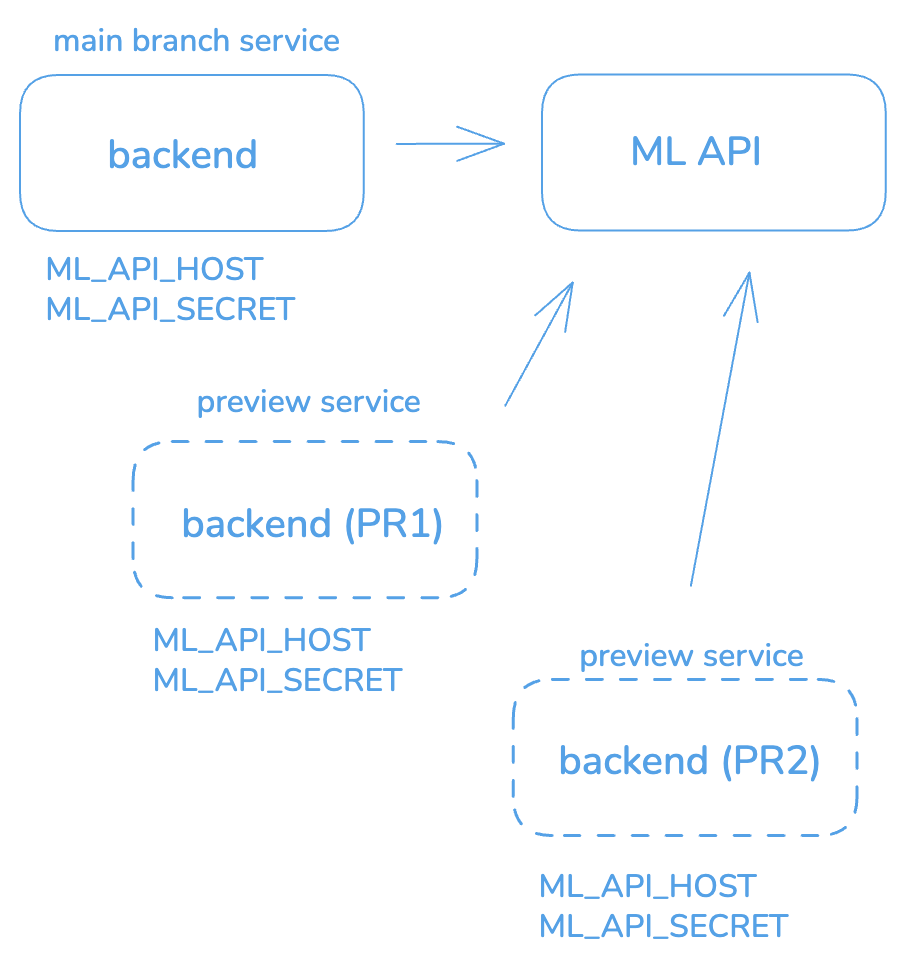
Say your original service depended on another service in the same environment called "ML API". This dependency may be
configured as secrets in the original service `Secrets` section as "ML\_API\_HOST" and "ML\_API\_SECRET".
You can update these keys in Secrets section to turn on "**Use in preview environments**" flag. It means that when a new
"preview service" is created for on PR, the secrets & their are values from the original service are copied over to the
"preview service" as well.
When the preview service comes up for any given PR, it comes up with same secrets "ML\_API\_HOST" and "ML\_API\_SECRET\_KEY"
set to point at the same "ML API" service. And it retains the dependency as main service.
 **No limits**: Since preview service is its own service with its own secrets, if you want it to point at a different
ML\_API service, you can visit the service > secrets section in LocalOps console, to edit the secret. There is no limit
on the dependencies you can configure for the ephemeral preview services.
#### Isolated cloud resources
Any service can define its cloud resource dependencies (like S3 bucket, SNS topic, RDS instance etc.,) in its
[ops.json](/environment/services/ops-json) file. When a new service is created, all those resources defined in
`ops.json` are provisioned exclusively for the service, automatically. And when the service is deleted, those resources
are deleted automatically.
When a new preview service is created specifically for the PR, the same workflow applies. Existing existing `ops.json`
configuration in the PR branch is read and new cloud resources are provisioned exclusively for the PR branch and the
preview service. The preview service is its own isolated service running the PR branch's code.
**preview\_only**: You can define `preview_only` in the dependencies if needed to spin up certain resources only in
preview services. Or spin up same resources with different configuration, just for preview services. Say you want to
provision a 10GB RDS instance for pull request previews but a 100GB RDS instance during other times.
In addition, resources in `ops.json` are configured differently in other ways by LocalOps, for preview services for
speed of boot-up and cost savings. Backups, encryption and monitoring are turned off in cloud resources created for
preview services.
Following services can be defined in `ops.json`:
1. S3 buckets
2. SNS topics
3. SQS queues
4. RDS Database instances - MySQL or Postgres
5. Elastic cache clusters - Memcache or Redis
#### Isolated database, cache, queues and workers
In addition to above cloud-managed resources, you can also spin any number of these services as ephemeral resources for
each PR, to run within the same environment/Kubernetes cluster:
1. Postgres / MySQL database
2. Redis / Memcache servers
3. RabbitMQ queue
4. Workers
So for example, you can make a brand new postgres server come up for each PR, in your environment.
Just add an `ops.json` in your Github repository that is configured for the main service, if you haven't done it
already.
In `ops.json`, add `previews` key and list down all dependencies like this:
```json theme={null}
{
"previews": {
"dependencies": {
"db": [
{
"id": "db",
"prefix": "db",
"engine": "postgres",
"version": "17.5",
"exports": {
"DB_HOST": "$host",
"DB_PORT": "$port",
"DB_USER": "$user",
"DB_NAME": "$db",
"DB_PASS": "$pass"
}
}
],
"cache": [
{
"id": "redis",
"prefix": "redis",
"engine": "redis",
"version": "8.0.3",
"exports": {
"REDIS_HOST": "$host",
"REDIS_PORT": "$port"
}
}
],
"queues": [
{
"id": "rabbitmq",
"prefix": "rabbitmq",
"engine": "rabbitmq",
"version": "4",
"exports": {
"QUEUE_HOST": "$host",
"QUEUE_PORT": "$port",
"QUEUE_VHOST": "$vhost",
"QUEUE_USER": "$user",
"QUEUE_PASS": "$pass"
}
}
]
},
"workers": [
{
"id": "worker",
"prefix": "worker",
"cmd": "node server.js",
"env": {
"variable": "value"
},
"count": 2
}
]
}
}
```
Within `exports` key, define all the information you want to export from the resource and inject them as environment
variables in your service.
All these resources will be created for each PR preview service and get deleted automatically when the PR is closed or
merged.
Checkout [ops.json docs here](/environment/services/ops-json#ephemeral-databases-and-services-for-pull-request-previews)
for more info.
#### Isolated cron service
`ops.json` is processed exclusively for any given preview service. So any cron configuration defined within the
`ops.json` is provisioned exclusively for the preview service.
Checkout [cron docs here](/environment/services/ops-json#configuring-cron-service) for more info.
#### Third party apps
You may use 3rd party services like Slack, Google Apps, and others for Integration, Authentication, Notifications etc.,
You may define these dependencies in "Secrets" section of the main service. And when the preview services comes up for a
given PR, secrets with **"Use in previews"** setting **turned on**, are copied over.
When this sharing isn't ideal in your case, you may follow one of the below strategies on a case by case basis.
1. Wait till the preview service comes up first time for a given PR. After it comes up, you may manually create a new
instance of your 3rd party app for the purpose of testing it in the preview service. And add its credentials in the
preview service's secret section.
2. If the 3rd party allows you to do #1 via their API, you can do so in your application/service boot-up logic, when the
preview service comes up. LocalOps passes in `LOPS_PREVIEW=true` in all preview services as in-built environment
variable.
3. When there is a possibility to share the same 3rd party integration app/id and create a new redirect URL in the app's
settings via their API, you can do the same, as a simplified case of #2 above. LocalOps passes `LOPS_SVC_HOST`
environment variable with the latest public url of the service.
Talk to us at [support@localops.co](mailto:support@localops.co) and we can come up with alternate strategies to make 3rd party apps work in preview
services.
### Book a Demo
Want to see full-stack preview environments in action? [Book a demo call](https://go.localops.co/tour) and we'll walk
you through the setup personally.
**No limits**: Since preview service is its own service with its own secrets, if you want it to point at a different
ML\_API service, you can visit the service > secrets section in LocalOps console, to edit the secret. There is no limit
on the dependencies you can configure for the ephemeral preview services.
#### Isolated cloud resources
Any service can define its cloud resource dependencies (like S3 bucket, SNS topic, RDS instance etc.,) in its
[ops.json](/environment/services/ops-json) file. When a new service is created, all those resources defined in
`ops.json` are provisioned exclusively for the service, automatically. And when the service is deleted, those resources
are deleted automatically.
When a new preview service is created specifically for the PR, the same workflow applies. Existing existing `ops.json`
configuration in the PR branch is read and new cloud resources are provisioned exclusively for the PR branch and the
preview service. The preview service is its own isolated service running the PR branch's code.
**preview\_only**: You can define `preview_only` in the dependencies if needed to spin up certain resources only in
preview services. Or spin up same resources with different configuration, just for preview services. Say you want to
provision a 10GB RDS instance for pull request previews but a 100GB RDS instance during other times.
In addition, resources in `ops.json` are configured differently in other ways by LocalOps, for preview services for
speed of boot-up and cost savings. Backups, encryption and monitoring are turned off in cloud resources created for
preview services.
Following services can be defined in `ops.json`:
1. S3 buckets
2. SNS topics
3. SQS queues
4. RDS Database instances - MySQL or Postgres
5. Elastic cache clusters - Memcache or Redis
#### Isolated database, cache, queues and workers
In addition to above cloud-managed resources, you can also spin any number of these services as ephemeral resources for
each PR, to run within the same environment/Kubernetes cluster:
1. Postgres / MySQL database
2. Redis / Memcache servers
3. RabbitMQ queue
4. Workers
So for example, you can make a brand new postgres server come up for each PR, in your environment.
Just add an `ops.json` in your Github repository that is configured for the main service, if you haven't done it
already.
In `ops.json`, add `previews` key and list down all dependencies like this:
```json theme={null}
{
"previews": {
"dependencies": {
"db": [
{
"id": "db",
"prefix": "db",
"engine": "postgres",
"version": "17.5",
"exports": {
"DB_HOST": "$host",
"DB_PORT": "$port",
"DB_USER": "$user",
"DB_NAME": "$db",
"DB_PASS": "$pass"
}
}
],
"cache": [
{
"id": "redis",
"prefix": "redis",
"engine": "redis",
"version": "8.0.3",
"exports": {
"REDIS_HOST": "$host",
"REDIS_PORT": "$port"
}
}
],
"queues": [
{
"id": "rabbitmq",
"prefix": "rabbitmq",
"engine": "rabbitmq",
"version": "4",
"exports": {
"QUEUE_HOST": "$host",
"QUEUE_PORT": "$port",
"QUEUE_VHOST": "$vhost",
"QUEUE_USER": "$user",
"QUEUE_PASS": "$pass"
}
}
]
},
"workers": [
{
"id": "worker",
"prefix": "worker",
"cmd": "node server.js",
"env": {
"variable": "value"
},
"count": 2
}
]
}
}
```
Within `exports` key, define all the information you want to export from the resource and inject them as environment
variables in your service.
All these resources will be created for each PR preview service and get deleted automatically when the PR is closed or
merged.
Checkout [ops.json docs here](/environment/services/ops-json#ephemeral-databases-and-services-for-pull-request-previews)
for more info.
#### Isolated cron service
`ops.json` is processed exclusively for any given preview service. So any cron configuration defined within the
`ops.json` is provisioned exclusively for the preview service.
Checkout [cron docs here](/environment/services/ops-json#configuring-cron-service) for more info.
#### Third party apps
You may use 3rd party services like Slack, Google Apps, and others for Integration, Authentication, Notifications etc.,
You may define these dependencies in "Secrets" section of the main service. And when the preview services comes up for a
given PR, secrets with **"Use in previews"** setting **turned on**, are copied over.
When this sharing isn't ideal in your case, you may follow one of the below strategies on a case by case basis.
1. Wait till the preview service comes up first time for a given PR. After it comes up, you may manually create a new
instance of your 3rd party app for the purpose of testing it in the preview service. And add its credentials in the
preview service's secret section.
2. If the 3rd party allows you to do #1 via their API, you can do so in your application/service boot-up logic, when the
preview service comes up. LocalOps passes in `LOPS_PREVIEW=true` in all preview services as in-built environment
variable.
3. When there is a possibility to share the same 3rd party integration app/id and create a new redirect URL in the app's
settings via their API, you can do the same, as a simplified case of #2 above. LocalOps passes `LOPS_SVC_HOST`
environment variable with the latest public url of the service.
Talk to us at [support@localops.co](mailto:support@localops.co) and we can come up with alternate strategies to make 3rd party apps work in preview
services.
### Book a Demo
Want to see full-stack preview environments in action? [Book a demo call](https://go.localops.co/tour) and we'll walk
you through the setup personally.